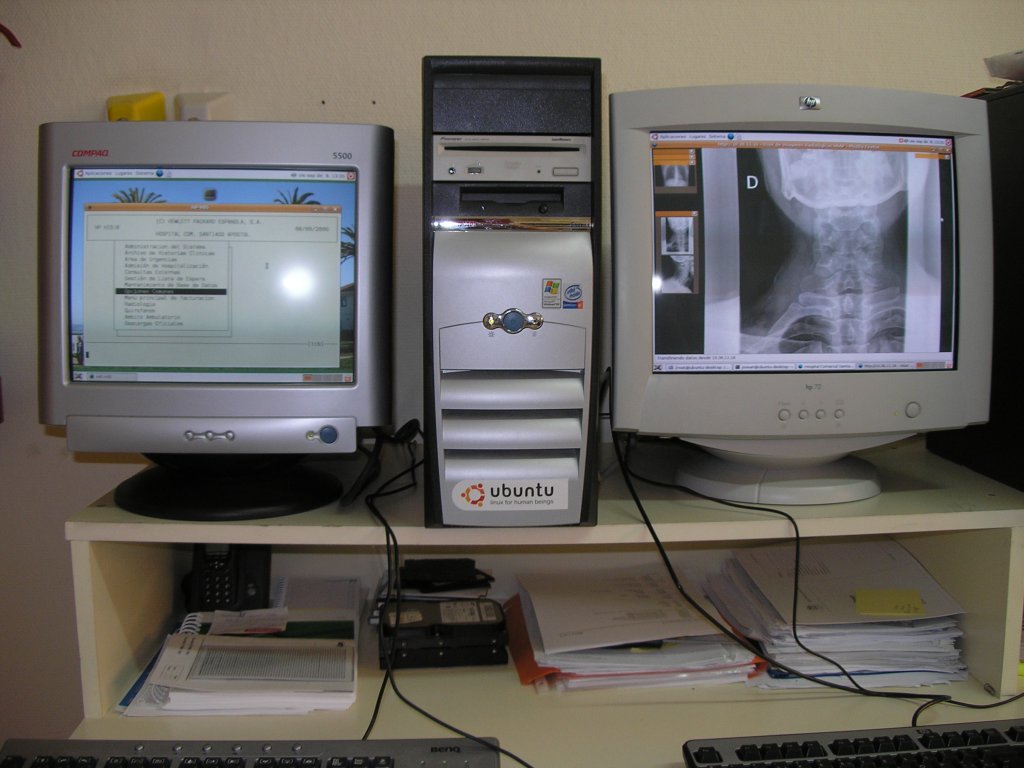
This project is just an evaluation prototype. It has been developed in a Hospital environment to determine if the computer on every medical examination room can be used simultaneously by two people.
Currently there is a computer on every examination room. Through the computer, some administrative tasks related to the patient are carried on by a nurse. There is also a web based information system, used by the physician to access to the medical information of every patient.
The goal is to share the same computer for administrative and medical tasks simultaneously (that is why only two seats are necessary in our case study) and evaluate the opinions of the final users about the new system.
Thank you very much for this tutorial !!
ReplyDeleteI am a newbie, so please forgive me if this question is too easy. I've googled some days for it but I've not been able to find an answer:
I'd like to have something similar to what you expose here, but I'd need to move apps (live) between both monitors, in a similar way to the one that you can do with Xinerama, but with two independients keyboard and mouse.
Do you know if this is possible ?
Thank you very much in advance !
I doubt it, as you are using two different X servers on top of a third one.
ReplyDeleteThat is, unless you find some kind of app allowing you to disconnect an app from one X server and reconnect it from another.
The two seats are different servers, and even different users can be logged on every seat.
ReplyDeleteAnyway, you can disable 'access control' (-ac) when launching every Xephyr instance. In this way one user could launch applications to be shown on the other terminal.
Incredible!! great work, and thanks for publishing it.
ReplyDeleteHow many seats are supported on a single PC server with a medium configuration (1 Gb RAM, CPU at 3 Ghz, ...)?
ReplyDeleteI have seen configurations up to 10 seats (have a look at http://userful.com/products/10-to-1-advantage)
ReplyDeleteThe number of effective seats depends mainly on the type of usage, and the requirements of the applications being used.
This two seats configuration has been heavily tested to prove stability: One of our tests included simultaneous use of: video playback, VNC remote access, playing of streaming audio, internet browser, openoffice, evince. These applications were working nice.
Your hardware configuration could support 6 users without problems, but the best way to confirm is just to make a prototype and test the system.
The multi server portion of X can easily be done using the nvidia-xconfig provided by the nvidia driver. See nvidia-xconfig -A for details. There is an option
ReplyDelete-a, --enable-all-gpus
Configure an X screen on every GPU in the system.
Which makes this portion easy.
Hi, im trying to use it, but, i have made the download of xephyr-compiled and i extract the files to /usr/ but, after this my X doent open anymore... i'm a little confuse in this part of your howto, can you help me?
ReplyDeletethanks
Your question has been answered in step 5: http://netpatia.blogspot.com/2006/09/multiseat-v-gdm-and-xkb.html
ReplyDeletePor lo que veo eres español, ¿tendrías este tutorial en castellano? me gustaría probar el tema este de varios puestos con una sóla máquina pero no tengo ni pajolera de inglés.
ReplyDeleteGracias.
Hi, i'm so happy with this tutorial, have the more updated information about that.
ReplyDeleteI have a NVIDIA FX 5700 Video Card with two output and i try to do it but i cant because the X Server right now cant do it. so i have to use it the Xephyr. well all it's configured ok. the only problem that i have it's that the keyboard on both seats have the keys very wear in another place's that the normal.
can you tell me if maybe i can fix that? and what files do i have change?
Have a look at step V.
ReplyDeleteIf you include the line rules="evdev" in the xkb configuration file, you will have ALL your keys missmatched. I have experienced this problem only when including such line.
Have you tried with different configuration parameters in that file?
Very nice Tutorial, works perfect.
ReplyDeleteThank you very much!
Greetings
Andre
Thank you for this great tutorial.
ReplyDeleteIt seems like there is no video accelation at all. If I grep a window and drag it, the window doesn't move as smooth as it does in the single seat environment. Is it normal?
I also found that glx is not supported.
Is there any way to increase video performance by tweaking X or Xephyr, if possible?
Jason
Hello! First, thanks for this tutorial!
ReplyDeleteIt truly works, it helped me set a multiterminal system in kubuntu.
I only had two problems:
First, my up arrow key doesn't work. In one of the terminals it opens Ksnapshot!!
Second, my system hangs from time to time. I really couldn't reproduce this behavior.
Do you have any ideas how can I trace the problem back to the source? I'm more interested in solving the second problem .
Thank you in advance!
OH... and third! glxgears and related aplications don't work either.
ReplyDeleteIn this moment, 3D acceleration (glx) is only supported on screen 0 (base X session) but is not supported on the sessions of every seat.
ReplyDeleteI'm affraid the problem is due to the compiled Xephyr. Xephyr can be compiled with or without glx support, and maybe this version does not include such support.
In the pending tasks, I have to try compiling Xephyr with glx support.
Hi, thank you for that information. I'll try to compile it myself.
ReplyDeleteI have another problem however. I upgraded to edgy (to see if I could solve a random hang problem I had in Dapper). The thing is now I can't even enter kde, it crashes in the splash screen.
I don't have gnome installed to test, but I installed icewm and it works but also crashes with some applications. Do you have any ideas?
Ok, I did a fresh edgy install. This time, however, I installed ubuntu instead of Kubuntu.
ReplyDeleteEverything works perfect... except everything that is kde related. Applications like amarok just kill my session.
Take into account that extensions related to acceleration are disabled. Maybe this is the origin of the problem?
ReplyDeleteAnyway, in my 'todo' tasks, I want to test this system with xglx (patched with evdev) instead of xephyr. Maybe this will solve issues related to graphics acceleration.
xglx (patched with evdev) - that sounds great. I'd love to try that - it might solve some of my problems also. How did the Xephyr with glx go? Have you got it working?
ReplyDeleteIt is a strange problem. I wonder what changed between Dapper and Edgy, since KDE worked almost flawless in dapper.
ReplyDeleteNow I can't use KDE, amarok, amsn, skype. All those applications kill my X server. I wonder what do they have in common and how can I debug this. The main problem is that, since I don't know where the exact problem is, I don't know where to submit the bug report.
OH... and xglx with evdev :D that would be something great....
ReplyDeleteI heve an error
ReplyDelete"Xephyr cannot open host display. Is DISPLAY set?"
Everybody knowns whats wrongs?
Thanks...
Notice the '-ac' parameter in the root X session, just to disable 'access control'.
ReplyDeleteBe sure to have such parameter if you are following the steps in the tutorial. Otherwise Xephyr will be unable to use the base X session.
Hi, I send you some information about glx with evdev support I found while asking some people:
ReplyDelete"The Xglx upstream code already has evdev support. It uses the x-input-evdev library. What you will need is to download/compile x-input-evdev [1] library and xgl-0-0-1 tree of xserver setting up --enable-xevdev to configure script."
HOT
ReplyDeletefor "the real multiseat" solution, please have a look at http://oldwiki.linux-vserver.org/MoreUbuntu
For sure you can also use Xephyr too.
best regards,
zeng
Hi,
ReplyDeletefinally I got my multiseat up and runnig after some initial problems. Many thanks to the author at this point!
The only problem I'm facing now, is that both of the seats always crushes when I turn the printer on.
I'm running debian testing_amd64 on an Athlon AM2 processor. Both of the Keyboards and mices are on a 7-port usb hub. The printer is an old HP Laserjet connected by an parallel2usb adapter on the same usb hub. After powering on the printer, both xephyr sessions end up consuming about 50% of CPU time and responds to no mouse or keyboard events. The strange thing is that I can switch to the console -tty after that, but can't restart X via gdm restart or anything else. I have to reboot the computer in order to get both seats running under X again.
I would apreciate if someone could help me on this, because I'm afraid my whife will not use the system anymore if this keeps on going :(
Regards
Andreas
PS. Is ther any mailing list / forum / wiki or anything else where this kind of problems can be discussed?
Hi,
ReplyDeletefinally I got my multiseat up and runnig after some initial problems. Many thanks to the author at this point!
The only problem I'm facing now, is that both of the seats always crushes when I turn the printer on.
I'm running debian testing_amd64 on an Athlon AM2 processor. Both of the Keyboards and mices are on a 7-port usb hub. The printer is an old HP Laserjet connected by an parallel2usb adapter on the same usb hub. After powering on the printer, both xephyr sessions end up consuming about 50% of CPU time and responds to no mouse or keyboard events. The strange thing is that I can switch to the console -tty after that, but can't restart X via gdm restart or anything else. I have to reboot the computer in order to get both seats running under X again.
I would apreciate if someone could help me on this, because I'm afraid my whife will not use the system anymore if this keeps on going :(
Regards
Andreas
PS. Is ther any mailing list / forum / wiki or anything else where this kind of problems can be discussed?
linux-vserver do not work with multiple head cards. The point on this tutorial is that you do not need to have several independent graphic cards.
ReplyDeleteI have an error, "Xephyr cannot open host display. Is DISPLAY set?".
ReplyDeleteI try to ubicate the "control acces", but not it encounter.
I try this in gdm.conf: command=/usr/bin/X -ac :1 -br.
... and no work, say that "there already appears to be an X server running on display :1...."
Thanks for help...
pd. (my English is terrible)
hi, how can i make a 6 or even 10 seat multiterminal desktop??
ReplyDeleteshould i use 5 dual headed video cards? is this possible? using pci? or pci-xpress? with agp is not possible, just 1 slot..
Any pointers please??
Thanks for your info
I have only experience in systems having two seats. You can have a look at the six head system, but they use a different approach.
ReplyDelete6 to 10 multiseat :
ReplyDeleteWell I have try that :
- 2 x pci-x dual-head cards and 1 pci dual-head card : only 5 screens worked
- 1 x pci-x dual-head card and 4 pci single head cards : only 5 screens worked
PROBLEM I thinks it's a IRQ problem
- 3 x pci-x dual-head cards with a special motherboard with 3 pci-x slots : all off the 6 screens worked !
More than 6 seats : I don't know anymore, but I think you must use matrox cards, but are there work I don't know
Hey people, does Xglx or Xephyr with GLX work? I use multiseat using Xephyr on Dapper over a year but I have no 3D accel. Now I'm planning to switch to Feisty or Gutsy with Xephyr+GLX or Xglx or XAT+MPX or maybe VirtualGL. Have you checked any of these options? /xeros
ReplyDeleteHi Josean
ReplyDeleteSpecial to Josean hemself.
Thanks for your great blog. I have the multiseat working with 8 seats, with a motherboard with 4 pci-express slots and 4 pci-express dual-head nvidia cards. It works fine. But there are 2 bugs in Xephyr:
1. When you log in and log off 4 times (on the same screen) the xephyr or gdm won't start anymore on this screen. Please test it on your multiseat.
2. When you start kde-related programs sutch as amarok, it restart gdm. I know these things are not your thing.
3. I think it's better we start up a mailinglist for test some things.
4. I have found someone on the net that have running multiseat with Xglx and beryl. You can find hem at www.multiseatcomputer.be Perhaps somebody ask hem how it works with Xglx.
5. I will try it with Xglx and I want work together for make it works. So a mailinglist or contact with msn can be relevant. Please Josean contact me at : jefke.vdm at skynet.be
Hi and thanks for your well elaborated steps. Is it possible to use the on-board graphics port in addition to a graphics card to configure a multi seat.
ReplyDeleteochienged@yahoo.com
Hi.
ReplyDeleteCongratulations on your great work.
Have you seen the similar Ndiyo project at http://www.ndiyo.org/ ?
It uses an external ethernet or USB box called a NIVO (Network In Video Out) to interface multiple monitors, keyboards and mice to a single Ubuntu Linux PC.
See especially the videos and 'hubster' (USB) section.
Richard Freeman (England)
i am a newbie to ubuntu. only been using it for 3 weeks. but been a sys admin for 5 years. what is the best motherboard to use for multi-seat? i have a test computer right now with ECS 965PLT-A motherboard with 2 PCIe X16 slots and 3 PCI slots, and 2 nVIDIA dual-head GeForce 7600SE GPU. will this setup work?
ReplyDeleteI have been trying with ubuntu 6.06 and 6.10 and 7.10 and edubuntu and nothing seems to work i have two identical monitors i get everything to work except when i get to the end when Xephyr.sh is supposed to call Xephyr from gdm
ReplyDeletecommand=/usr/sbin/Xephyr.sh -display :0.1 -xauthority /var/lib/gdm/:0.Xauth -fullscreen -kbdphys usb-0000:00:1d.1-1/input0 -mousephys usb-0000:00:1d.1-2/input0 -use-evdev
it will not run on the diferente login windows what appears is 2 desktops diferent but no login...
Please help..
forgot to mention my card from the above post...
ReplyDeleteestudiante@estudiante-desktop:~$ lspci |grep -i vga
0000:01:00.0 VGA compatible controller: Matrox Graphics, Inc. G400/G450 (rev 82)
I found this can be useful: http://research.edm.uhasselt.be/~jori/page/index.php?n=Misc.DualSeatX
ReplyDeleteIt's multiseat station based on Xgl, I didn't try yet but I will soon.
You dont happen to have an automating script for newbies who need to have a multiseat in dual-head vga cards environment? I would appreciate very it very much.
ReplyDeleteWell here's to saving people a bunch of hellish problems due to the new HAL/X11 Input Hotplugging infrastructure. This automatically adds keyboards and mice and butchers MultiSeat setups...luckily I found this gem in the ServerFlags section of the new xorg.conf:
ReplyDeleteOption "DisableModInDev" "boolean"
This disables the parts of the Xorg-Misc extension that can be
used to modify the input device settings dynamically. Default:
that functionality is enabled.
For those looking for an automatic script Userful has a free-2-user solution that is very high performance and uses single-chip dual-head video cards.
ReplyDeletehttp://userful.com/free-2-user
They have RPMs and DEB packages they are also included in Ubuntu Multiverse.
http://support.userful.com/wiki/index.php/How_To/UMx/Userful_Multiplier_on_Ubuntu
por favor como puedo hacerlo con ubuntu 10.10 0 o 11.10 ya q en 9.04 o 8.04 no me permite descargar el archivo Xephyr gracias y felicidades ...
ReplyDelete